
Network isolation
The terminal reaches FTIR.fun only. The instrument PC keeps no general internet access, which helps satisfy laboratory security and data-governance requirements.
FTIR.fun Gateway Terminal · Networked instrument edition
The Gateway Terminal gives a laboratory instrument computer a dedicated connection to FTIR.fun while blocking general internet access. It supports real-time library and interpretation updates, and fits laboratory network-security requirements.
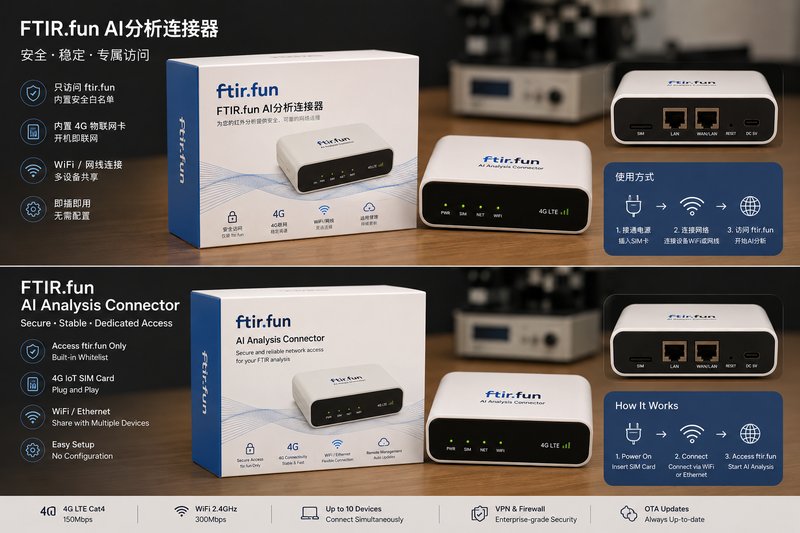
The terminal reaches FTIR.fun only. The instrument PC keeps no general internet access, which helps satisfy laboratory security and data-governance requirements.
Online reference-library and interpretation improvements reach the instrument computer immediately, with no manual version updates.
Supports legacy and modern laboratory computers. Connect by the terminal Wi-Fi or LAN, with 4G fallback where lab Wi-Fi is unavailable.
The Gateway Terminal is the networked edition. Analysis runs on FTIR.fun servers through the dedicated terminal connection. If the laboratory requires fully offline software with no internet connection at all, use FTIR.fun Local instead.
The $299 price covers the terminal hardware and network isolation. FTIR.fun analysis access is billed separately with credits or a subscription.
One terminal with a dedicated FTIR.fun connection. Worldwide shipping included.
| Requirement | Gateway Terminal | FTIR.fun Local |
|---|---|---|
| Internet | Required, through the isolated terminal. | Not required. |
| Where analysis runs | On FTIR.fun servers. | On your own workstation. |
| Updates | Real-time online updates. | No real-time updates; fixed local installation. |
| Price | $299 terminal, plus credits or a subscription. | $6,980 one-time perpetual license. |
| Network security | FTIR.fun-only connectivity; all other traffic isolated. | No network connection at all. |
Connect power and let the terminal establish its dedicated FTIR.fun connection.
Connect the instrument computer by the terminal Wi-Fi or LAN, following the supplied setup guide.
Open the browser on the instrument PC. Only FTIR.fun is reachable through this connection.